Skip to content
Download

Attention & focus · Windows, Android and iPhone

It doesn’t ask for willpower. It gives it back.

Vuelve records where your day goes, sets up your computer for what you’re about to do, and blocks the rest when it matters. No walls: breaks that cost whatever you decide.

Windows 10 & 11 · 64-bit · ~12 MB · free, with 14 days of Premium

Heads-up: the Windows app’s interface is in Spanish for now. English is on the way.

Who it’s for

For anyone with something that matters on their plate.

Nobody ever built anything with the door wide open. Anyone with something that matters decides up front what deserves their attention; the rest never even knocks.

  • Signal and noise.

    Kevin O’Leary, who worked with Steve Jobs, puts it this way: the signal is the three to five things you have to get done in the next 18 hours. Everything else is noise. Jobs, he says, ran at 80 signal, 20 noise.

    Kevin O’Leary on The Diary of a CEO ↗
  • A cabin with no noise.

    Twice a year Bill Gates shut himself away for a week alone to read and think: his “think weeks”. The cabin was never the point. The point was that nothing got in that he hadn’t chosen.

    Gates Notes ↗
  • Resisting costs you.

    In one experiment, the people who moved the distraction out of reach hit their goals more often than the ones who tried to resist it. What never reaches you, you never have to resist.

    Duckworth et al., 2016 · J. Educ. Psychology ↗

Top executives don’t have more willpower: they have better filters. Vuelve is your private secretary. It waits at the door of your computer, stops the noise and only lets through what actually moves the needle on your goals. Stop negotiating with distractions: work behind a closed door.

01 / A day with Vuelve

From the first click to bedtime.

Most blockers only know how to say “no”. Vuelve stays with you all day: it helps you start, keep going and stop in time. Everything below is in the 14-day trial; what stays free is under Pricing.

  1. 09:00 Start

    The hard part is rarely closing TikTok. It’s opening the document.

    A setup opens your programs, sites and documents in one click and starts a focus session. In strict mode, everything else is closed until you’re done.

    Thesis 3 things · 90 min · everything else blocked
  2. 09:48 Keep going

    Ten minutes straight, and the panel notices.

    With the window closed, a floating panel keeps you company: time on task, the app in front and what’s next on your agenda. After ten minutes it switches to “Focused”. And if you drift to something draining, it asks instead of cutting you off.

    Drifted off?

    You’ve been on YouTube for a while during your session.

  3. 11:12 The urge

    Breathe for twenty seconds. Then it’s your call.

    A block doesn’t have to slam the door. In breathe mode, a veil covers what you just opened and breathes with you; when it’s done, you choose: “Go in” or “Better not”.

    Breathe for 20 s before going in

    Now it’s your call

  4. 13:30 Breaks

    A “no” lasts an afternoon. A “not yet” lasts months.

    Seven kinds of break per time slot: pomodoro, ration, reward, typing, waiting, breathing and sessions. A ration only runs down while you use what’s blocked, and refills when you say.

    Social · today’s ration
    30:00 left
    Running: YouTube in front Paused: you’re in your editor
    Refills every day at 06:00
  5. 16:05 Protect

    Strengthening is free. Weakening costs.

    Pausing, switching off or loosening a block goes through the friction you chose with a cool head: waiting, typing or a password. In “Watched wait”, the countdown restarts if you touch the mouse. Adding something to a block, though, costs nothing.

  6. 18:00 Your plan

    What you planned and what happened, side by side.

    Draw your agenda by dragging on the “Plan” lane and read it next to what you actually did, with your Google, Outlook or iCloud calendar alongside. When it matters, the alarm dims the whole screen and rings.

    Plan
    What happened
  7. 23:00 Stop

    Bedtime. Your words, not ours.

    Before your bedtime, the screen warms up slowly and your monitor’s real brightness goes down. During the day: reminders to rest your eyes, drink water or move, and NEURO tips that cite the study they come from.

02 / Principles

The rules that aren’t up for negotiation.

  • 01

    A critical process is never closed.

    A blocker that locks you out of your own computer isn’t a blocker. It’s checked twice before acting.

  • 02

    When in doubt, allow.

    Cutting something off can’t be undone. Vuelve only closes things when it’s sure that’s what you asked for.

  • 03

    Nothing switches off on an error.

    If something fails, the blocks stay up: a block that falls over opens exactly what it was meant to protect.

  • 04

    NEURO describes; it doesn’t judge.

    Every metric shows its definition next to the number. And a tip without a published study behind it doesn’t make it into the app.

  • 05

    Your data stays on your computer.

    Your history lives on your machine and the keyboard is never read. Our server only checks your licence: it never sees which apps you use or which sites you visit.

  • 06

    Paused, not deleted.

    Stop paying and you lose nothing: whatever doesn’t fit the free version is paused exactly as you left it, and comes back the moment you renew.

03 / And also

Everything else, built in too.

  • Projects as time-lapses

    Track time on a project and save a screenshot every so often. When you finish, you get the hours back — and the film.

  • Categories on two axes

    What each app is and what it does to your attention: builds, neutral or drains. It recognises around 390 programs and 480 sites.

  • Recommended blocks

    Four ready in one click, each with its citation: before bed, focus mornings, rationed social media and games only in the evening. With Premium.

  • No clock tricks

    Winding back Windows’ clock doesn’t buy you breaks. And with Premium you can shut the back doors: Task Manager, the uninstaller and a 24-hour lock.

  • A summary you can read

    Your week on one screen that follows your mouse. Classify, compare and send an app to a block from the same row.

  • Genuinely yours

    Light, dark and AMOLED themes. Full backup and a complete wipe whenever you like, free. CSV export with Premium.

04 / On your phone

The same method, in your pocket.

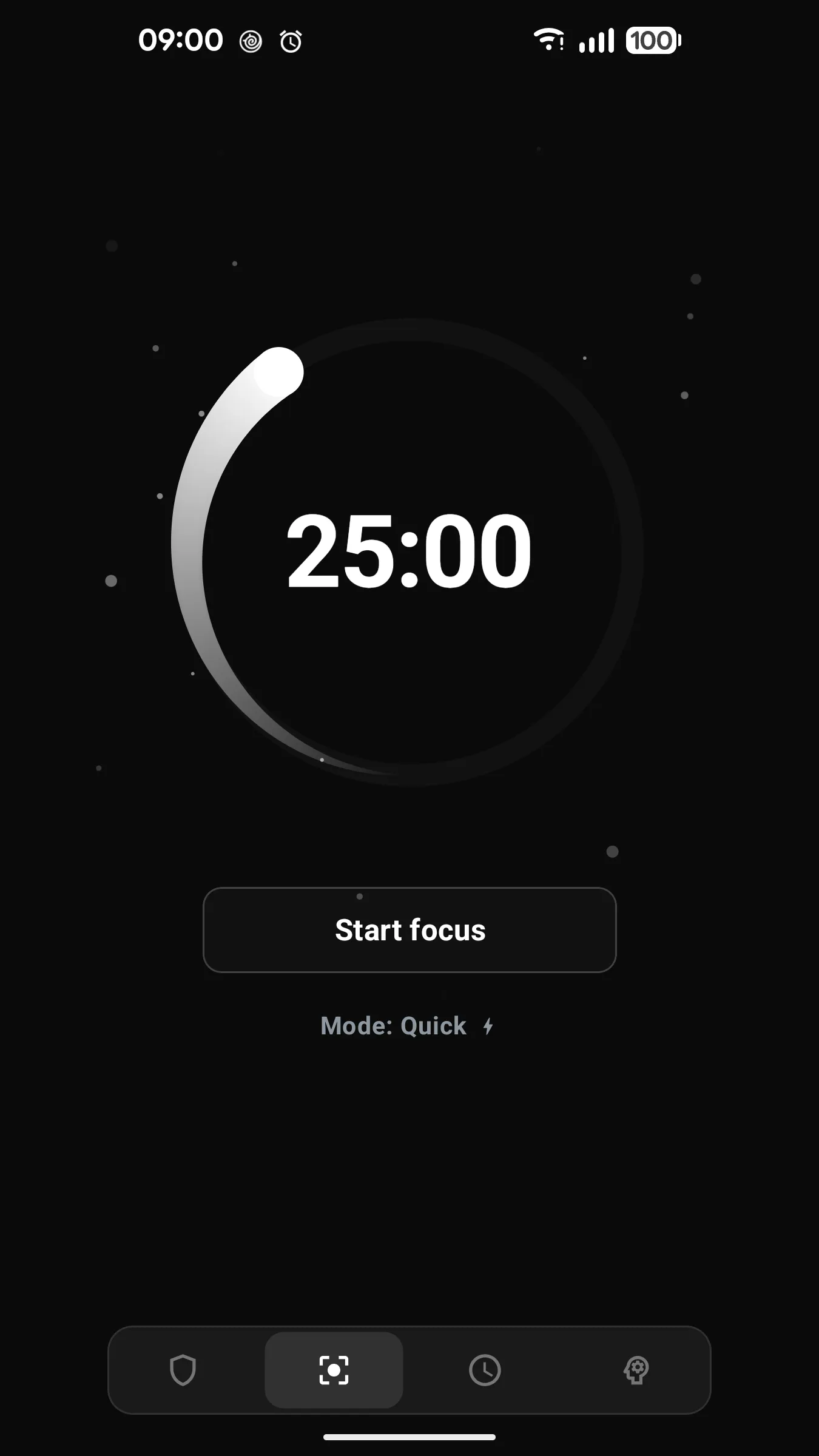
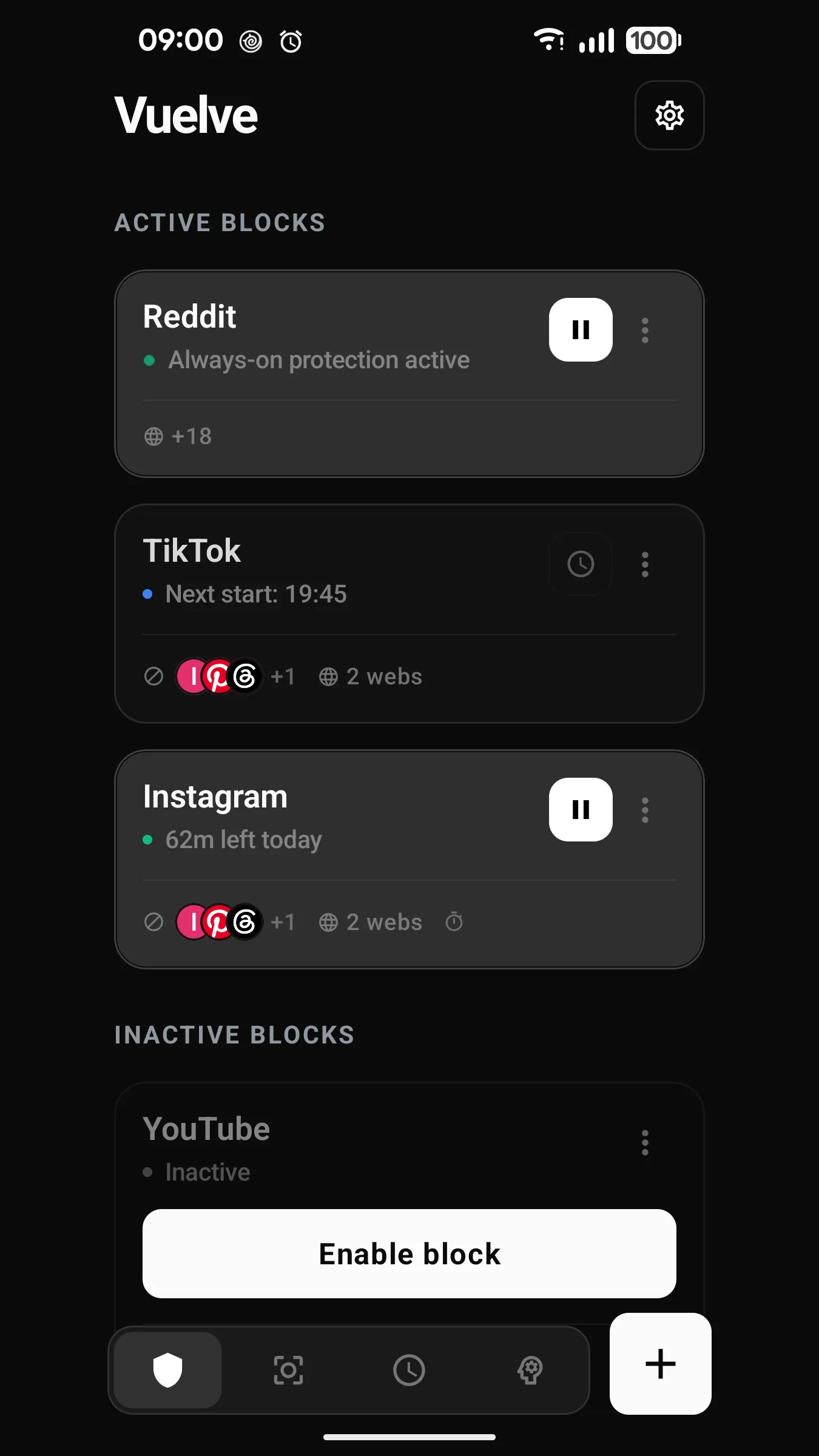
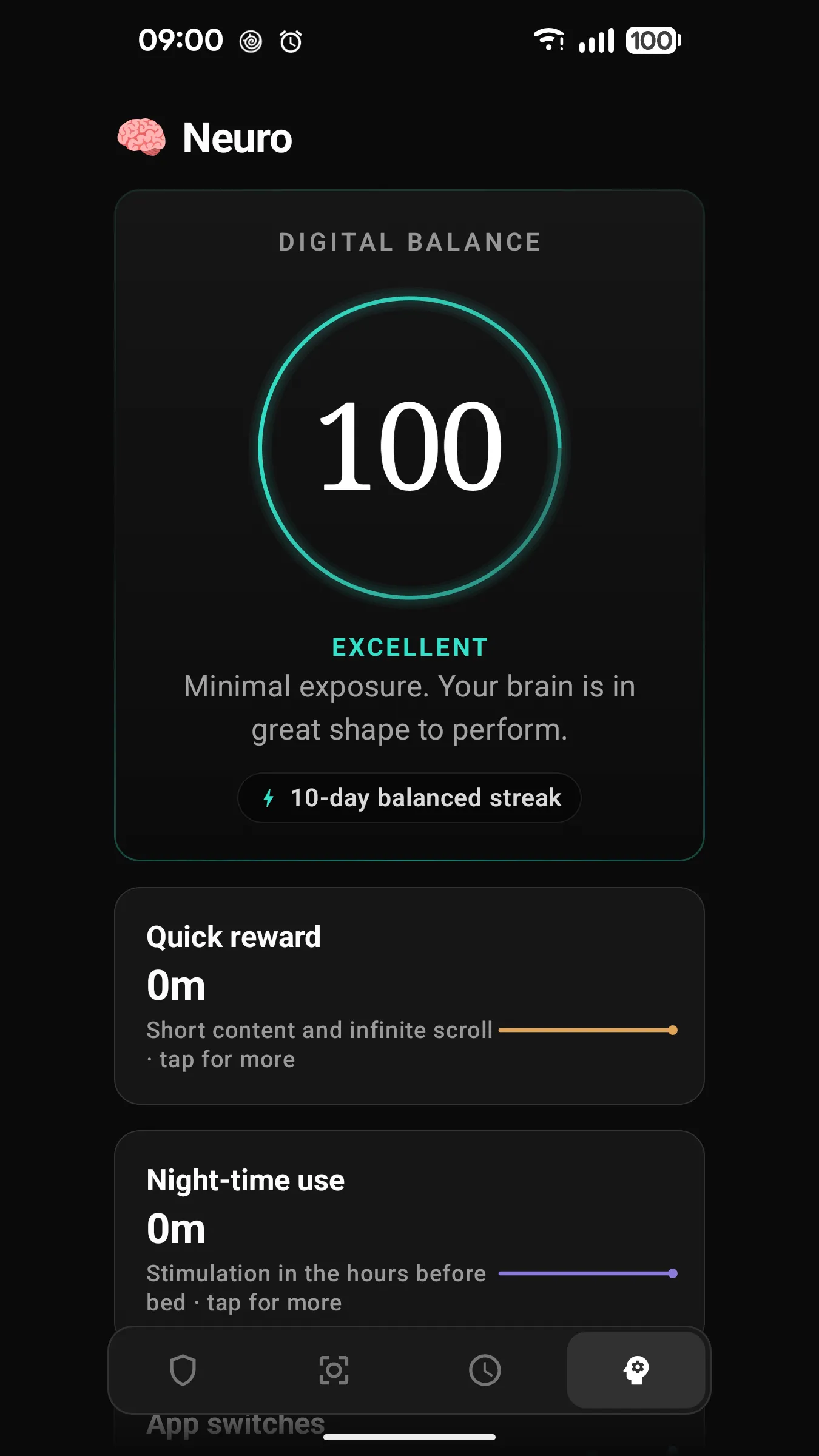
On Android and iPhone, Vuelve blocks apps and websites with schedules, usage limits and the friction you choose. With Bunker mode for sessions you can’t leave, and NEURO to see how your balance is changing. No account, no ads, no servers.

  • Blocks with schedules and usage limits
  • Bunker mode
  • NEURO: your digital balance
  • No account, no ads, no servers

On your phone, Premium is bought inside the app through Google Play or the App Store. The Windows licence is separate; the Bundle that joins computer and phone comes later.

Focus sessions
Blocks that hold
Your digital balance

05 / Pricing · Windows

Try all of it. Keep what works for you.

You start with 14 days of Premium, no card. After that, carry on free with the basics or keep everything. Your licence is your email: nothing to copy.

Free

€0 forever

  • Automatic tracking, schedule, agenda and floating panel
  • 2 blocks, one app or one site each
  • Breathe before going in
  • 1 mode that warns you if you drift and 1 time-lapse project
  • NEURO reminders and night screen
  • 7 days of history and a weekly summary

Download

Premium unlocks everything

  • + Unlimited blocks, by whole category
  • + All adult content at once
  • + All 7 kinds of break
  • + Friction to switch them off
  • + Modes that block
  • + Back doors shut and uninstall lock
  • + Your whole history
  • + 30- and 90-day summaries
  • + NEURO sleep and tips from your data
  • + Unlimited projects, no watermark
  • + External calendar and CSV
  • + Two computers

Monthly

€5.99 / month

Cancel any time from the customer portal.

Subscribe
Most popular

Yearly

€49.99 / year

Works out at €4.17 a month · over 3 months free.

Subscribe

Lifetime

€99.99 one-time

Every future Desktop version, no fees.

Buy

14 days of Premium free the first time you open Vuelve, no card. Already installed? Settings → Licence → “Try Premium free for 14 days”.

Prices include VAT. Secure payment with Stripe: card, Apple Pay or Google Pay. Invoice by email.

The Bundle with the phone comes later. Desktop plan owners will be able to upgrade.

Before you buy: Purchase terms · Privacy policy

06 / Activation

Three minutes from checkout to Premium.

  1. 01

    Pay with your email

    Stripe charges you and tells us. Your licence is tied to the email you use at checkout.

  2. 02

    Get the welcome email

    It arrives in seconds with the download link and the steps. No licence keys.

  3. 03

    Activate in the app

    Settings → Licence → “I have a licence”, type your email and the 6-digit code we send. Done.

07/Download

Install it and start tracking today.

Windows 10 / 11, 64-bit · Installs without admin rights · Updates itself

  1. 1Click “More info”
  2. 2Click “Run anyway”

Windows may show a blue warning the first time (“Windows protected your PC”). Click “More info” and then “Run anyway”: it’s a new program still building reputation.

08 / FAQ

What people ask before paying.

What happens to my data?

It stays on your computer. Vuelve never reads your keyboard, and its server only checks your licence: it never sees which apps you use or which sites you visit.

Is the app in English?

Not yet: the Windows app’s interface is in Spanish for now, and the English version is on the way. The Android and iPhone apps are already in English.

Can I use it on two computers?

Yes, one licence covers two computers at once. From Settings → Licence you can release one to use it elsewhere.

What’s in the free version?

Automatic tracking, the schedule, the agenda, the floating panel, the night screen and NEURO reminders, in full. And a taste of the rest: two blocks of one app or one site each (with breathe-before-entering), one mode that warns you if you drift, one watermarked project and the last 7 days of history. Everything else keeps being recorded.

What if I cancel or the trial ends?

Premium stays until the end of the period you paid. After that nothing is deleted: whatever doesn’t fit the free version is paused exactly as you left it, and comes back when you renew. A blocking mode already running finishes its session, and the uninstall lock stays on until you ask to remove it.

Does it work offline?

Yes. The licence renews itself when there’s a connection and lasts a month without one (three months on the yearly plan).

Does it block websites?

Yes, with the Vuelve extension for Chrome and Edge, which also tracks time per site. For now it’s installed by hand, following the steps in the app.

Does the Windows licence cover my phone?

Not yet: on Android and iPhone, Premium is bought inside the app through Google Play or the App Store. The Bundle that joins computer and phone comes later.

Is there a Mac version?

Not for now: Vuelve for desktop runs on Windows 10 and 11.

Refunds?

If it doesn’t win you over in the first 14 days, write to us and we’ll refund you.

Your attention, back.

Download it free, try Premium for fourteen days and see your day with new eyes.

Downloading Vuelve…

When you open it, Windows will show a blue warning. That’s normal.

Vuelve is 100% safe and private: it runs locally and your data never leaves your computer. The Windows warning is just a routine precaution for recent programs while they build up downloads.

  1. 1Click “More info”
  2. 2Click “Run anyway”

If your browser hesitates about the download first, choose “Keep”.