 Vuelve
Free
€0 forever
- 2 blocks of up to 5 apps each
- One schedule and daily limits
- Waits before pausing
- One habit that unlocks apps
- Quick Focus
- Your Digital Balance and today’s screen time
- Habit log by week and by month
 Attention & focus · Windows, Android and iPhone
Vuelve records where your day goes, sets up your computer for what you’re about to do, and blocks the rest when it matters. No walls: breaks that cost whatever you decide.
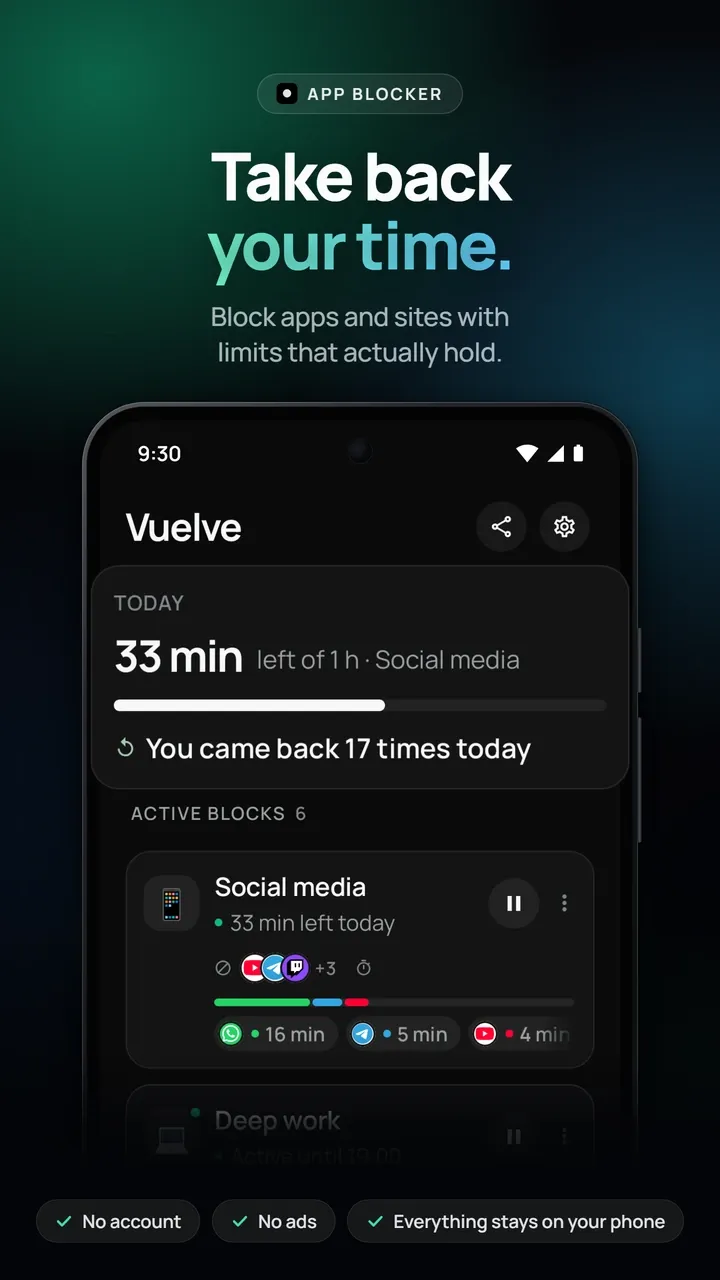
You unlock your phone to check the time and resurface twenty minutes later. Vuelve blocks the apps eating your day with limits that actually hold, and hands them back once you’ve done what you set out to do.
Windows 10 & 11 · from the Microsoft Store · free, with 14 days of Premium
Free, with Premium inside the app · no account, no ads
or scan it with your phone
iPhone & iPad · free, with Premium inside the app · no account, no ads
or scan it with your phone
0
keystrokes recorded: Vuelve never listens to your keyboard
~1 s
to close whatever is blocked
7
kinds of break, besides the wall
0
bits of your activity on our server
0
accounts, ads or servers: everything stays on your phone
30 s
of breathing before you open what you blocked
2
blocks free for good, up to 5 apps each
0–100
today’s Digital Balance, in a single number
Who it’s for
Nobody ever built anything with the door wide open. Anyone with something that matters decides up front what deserves their attention; the rest never even knocks.
Kevin O’Leary, who worked with Steve Jobs, puts it this way: the signal is the three to five things you have to get done in the next 18 hours. Everything else is noise. Jobs, he says, ran at 80 signal, 20 noise.
Kevin O’Leary on The Diary of a CEO ↗Twice a year Bill Gates shut himself away for a week alone to read and think: his “think weeks”. The cabin was never the point. The point was that nothing got in that he hadn’t chosen.
Gates Notes ↗In one experiment, the people who moved the distraction out of reach hit their goals more often than the ones who tried to resist it. What never reaches you, you never have to resist.
Duckworth et al., 2016 · J. Educ. Psychology ↗Top executives don’t have more willpower: they have better filters. Vuelve is your private secretary. It waits at the door of your computer, stops the noise and only lets through what actually moves the needle on your goals. Stop negotiating with distractions: work behind a closed door.
Top executives don’t have more willpower: they have better filters. Vuelve is your private secretary. It waits at the door of your phone, stops the noise and only lets through what actually moves the needle on your goals. Stop negotiating with distractions: decide once, with a clear head.
▶ Start · Study
Bring your mouse closer: it looks at you. Click it: it cheers up.
01 / Eco
Meet Eco: a desk buddy for your computer. It does what you do without getting in the way, tells you what’s next and celebrates what you finish. Helpful first; cute second.
The floating panel, serious and complete, with a dot of colour.
Eco sits on the panel. Drag it out and it flies; its little home calls it back.
No panel: Eco stands on the taskbar and talks to you in speech bubbles.
Eco makes no sound, never scolds you, never asks for attention and keeps still while you work. And if it distracts you, it switches off in one click.
02 / A day with Vuelve
Most blockers only know how to say “no”. Vuelve stays with you all day: it helps you start, keep going and stop in time. Everything below is in the 14-day trial; what stays free is under Pricing.
01 / A day with Vuelve
Most blockers only know how to say “no”. Vuelve asks for a habit in return, makes you pause for a moment and shows you how you’re doing. This is what it looks like on your phone.
09:00 Start
A setup opens your programs, sites and documents in one click and starts a focus session. In strict mode, everything else is closed until you’re done.
09:48 Keep going
With the window closed, a floating panel (or Eco, if you like) keeps you company: time on task, the app in front and what’s next on your agenda. After ten minutes it switches to “Focused”. And if you drift to something draining, it asks instead of cutting you off.
Drifted off?
You’ve been on YouTube for a while during your session.
11:12 The urge
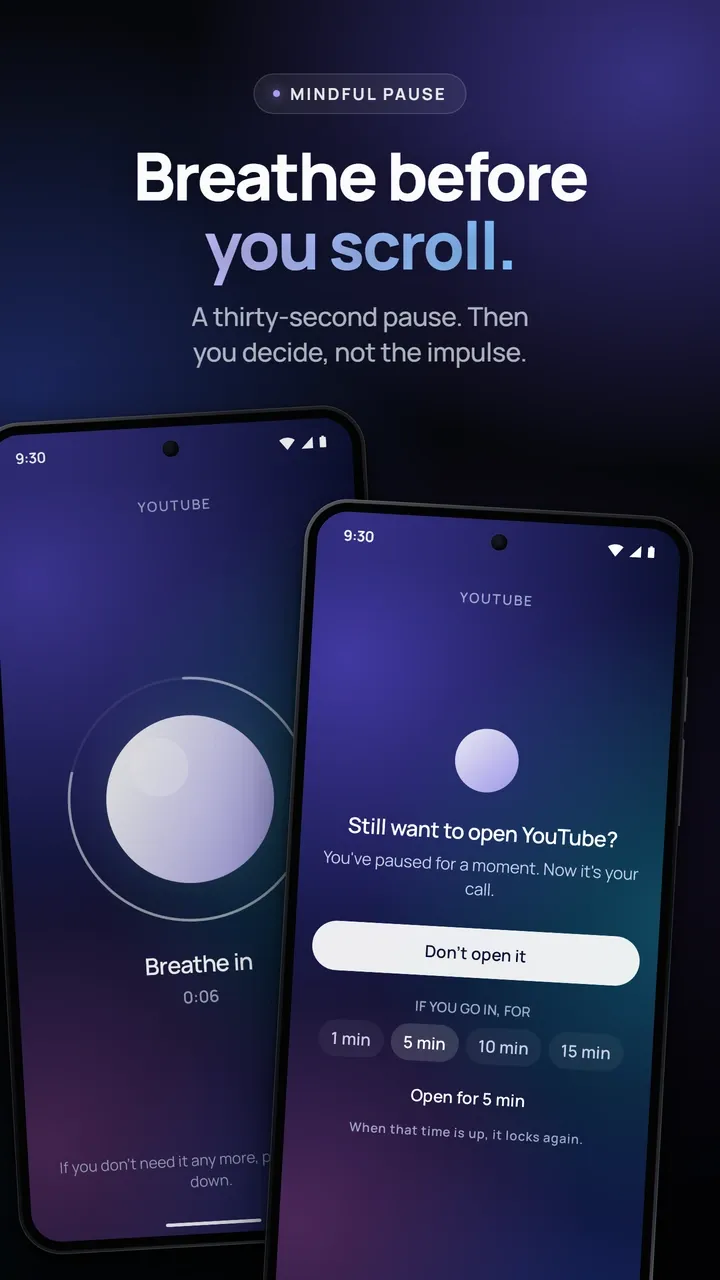
A block doesn’t have to slam the door. In breathe mode, a veil covers what you just opened and breathes with you; when it’s done, you choose: “Go in” or “Better not”.
Breathe for 20 s before going in
Now it’s your call
13:30 Breaks
Seven kinds of break per time slot: pomodoro, ration, reward, typing, waiting, breathing and sessions. A ration only runs down while you use what’s blocked, and refills when you say.
16:05 Protect
Pausing, switching off or loosening a block goes through the friction you chose with a cool head: waiting, typing or a password. In “Watched wait”, the countdown restarts if you touch the mouse. Adding something to a block, though, costs nothing.
18:00 Your plan
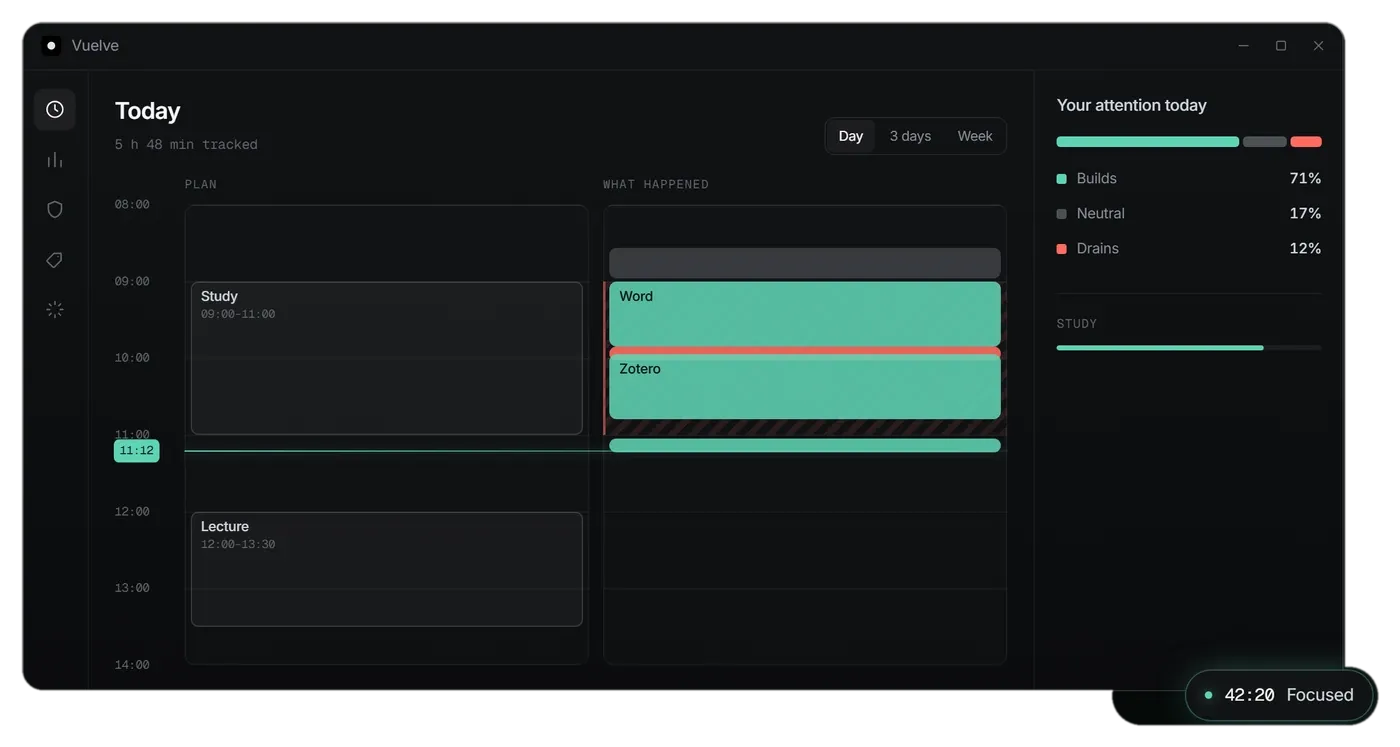
Draw your agenda by dragging on the “Plan” lane and read it next to what you actually did, with your Google, Outlook or iCloud calendar alongside. When it matters, the alarm dims the whole screen and rings.
23:00 Stop
Before your bedtime, the screen warms up slowly and your monitor’s real brightness goes down. During the day: reminders to rest your eyes, drink water or move, and NEURO tips that cite the study they come from.
07:30 Your morning first
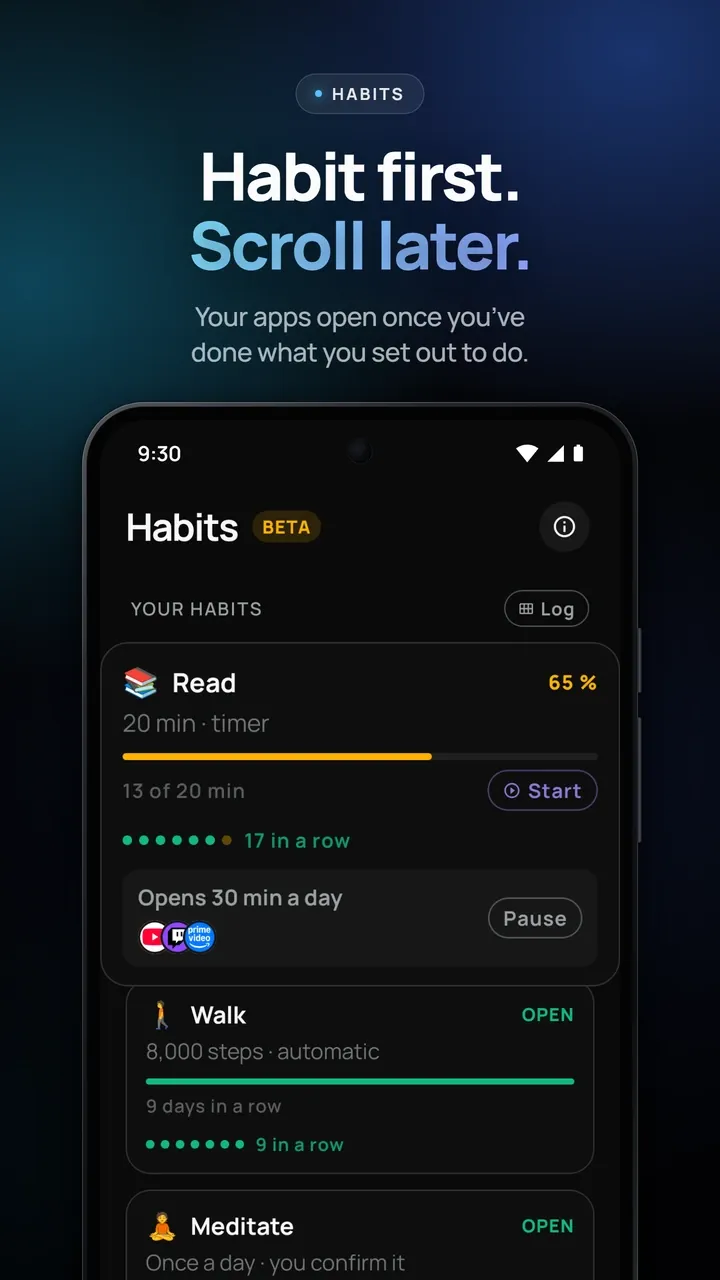
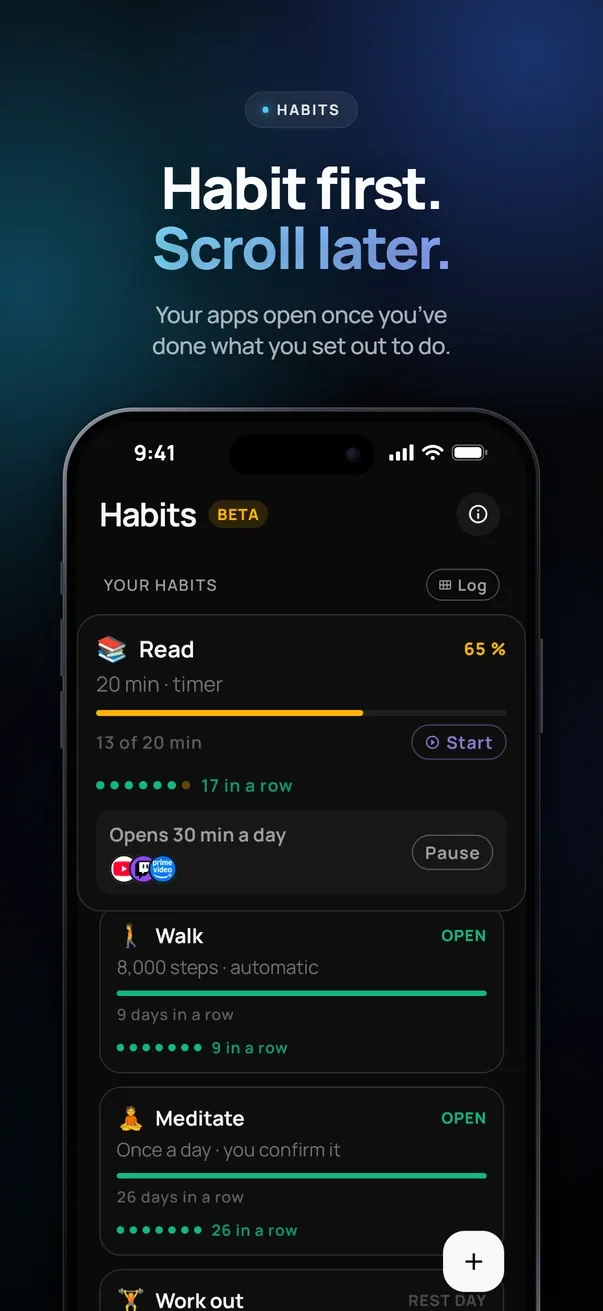
Some blocks don’t open on the clock: they open when you’ve done what you set out to do. Read, walk, work out or study, and your apps open for as long as you decided. Steps and exercise are checked automatically.
Free: one habit that unlocks apps · Premium: as many as you like
20 min · timer
Opens 30 min a day
8,000 steps · automatic
Once a day · you confirm it
30 min · automatic
09:30 Focus
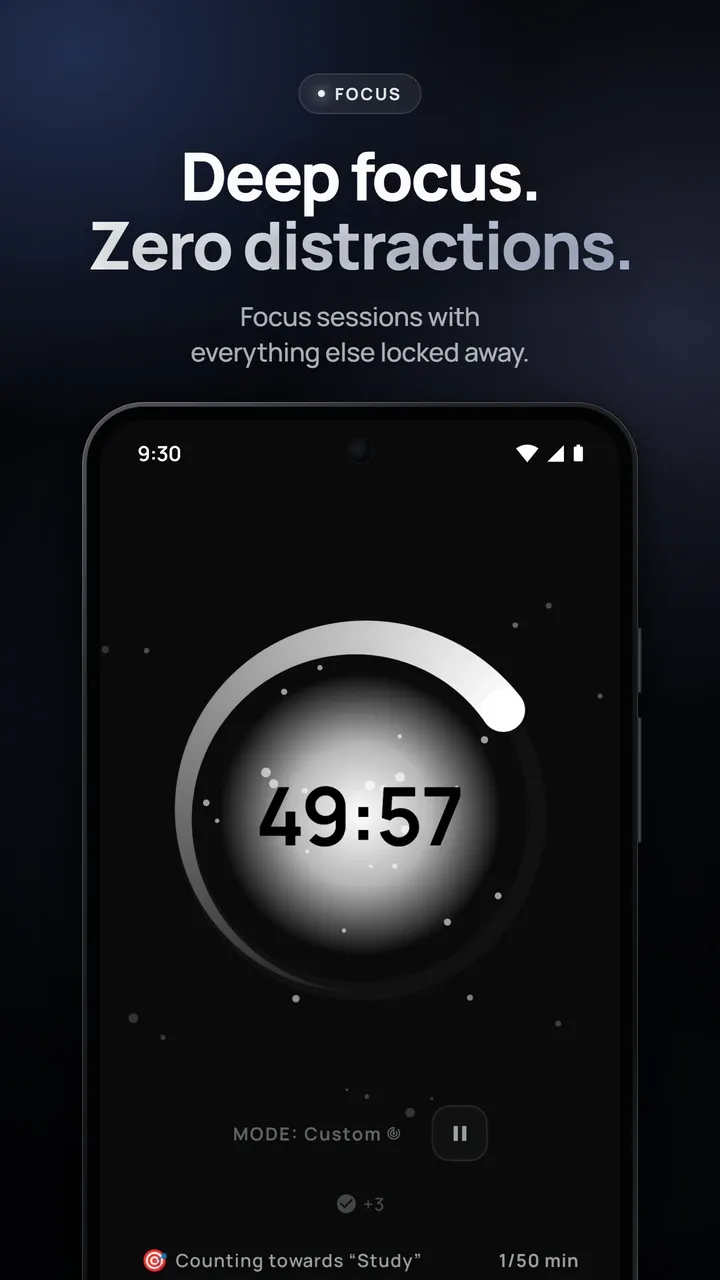
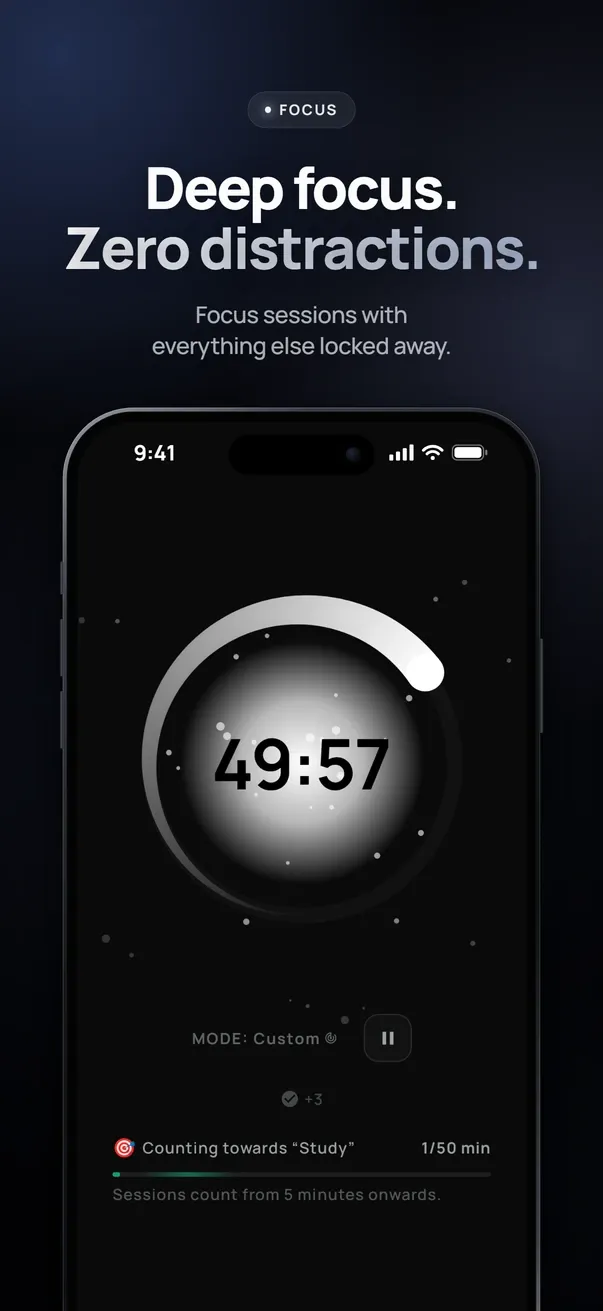
A focus timer with three levels. Quick starts in one tap; Custom leaves open only what you choose; in Bunker mode you can’t leave until it ends. And every session counts towards your study habit.
Free: Quick Focus · Premium: Custom and Bunker
MODE: Quick
Session complete
Sessions count from 5 minutes onwards.
11:12 The urge
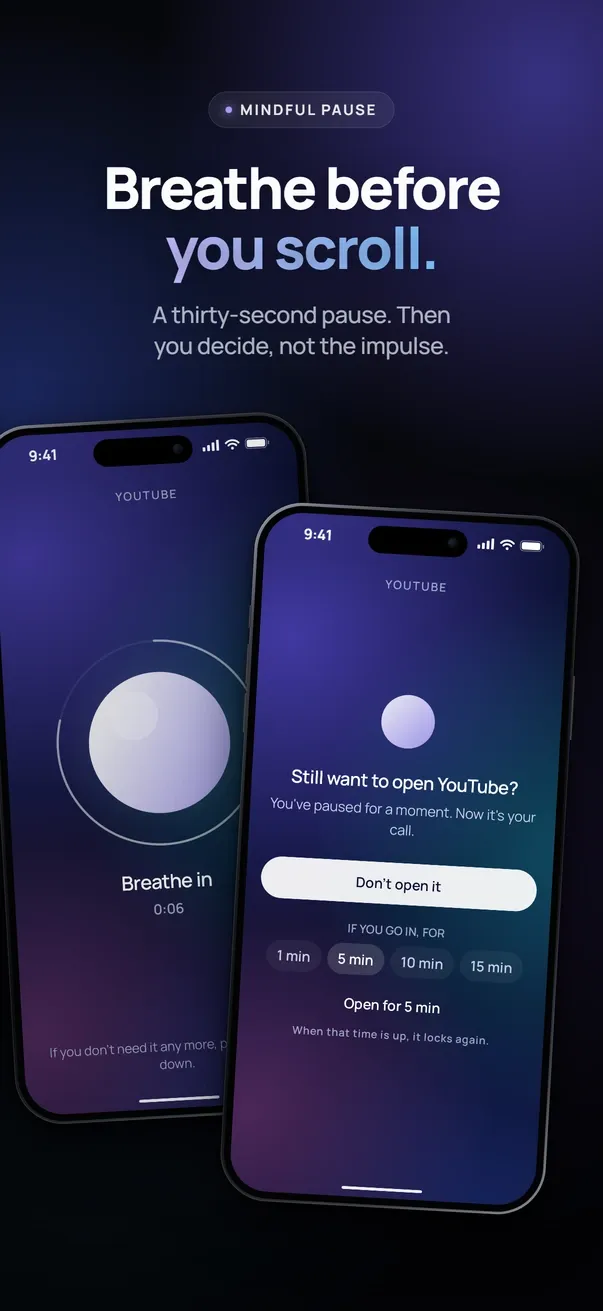
You go to open something you blocked and, before you get in, thirty seconds of breathing. When it’s done, you choose: “Don’t open it”, or go in for exactly as long as you pick. Then it locks itself again.
On iPhone you get there from the block’s notification or with a Shortcuts automation.
Premium
YouTube Social
Breathe in Breathe out
0:12
If you don’t need it any more, put the phone down.
You’ve paused for a moment. Now it’s your call.
Don’t open itIf you go in, for
Open for 5 min
When that time is up, it locks again.
You came back 16 times today
13:30 The limit
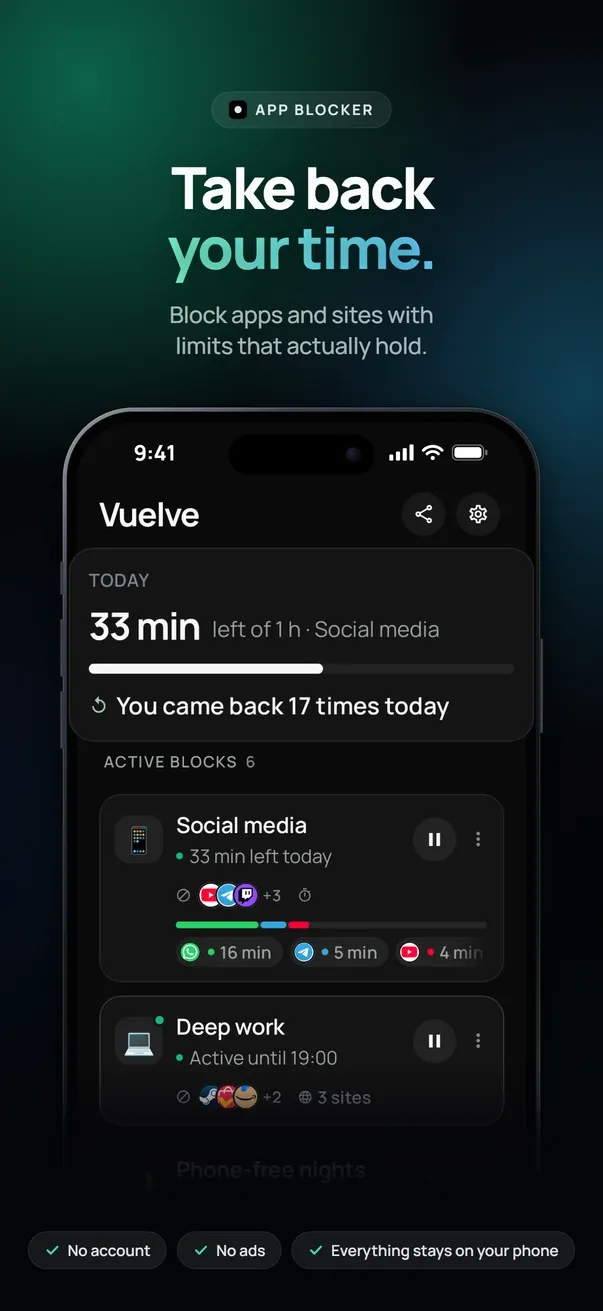
Put a daily limit on the apps that pull at you most. Each block shows how much you have left and, when it’s gone, it’s gone: to keep going you have to sit through the wait you chose with a clear head.
Free
Today
33 min left of 1 h · Social
You came back 15 times today
Active blocks4
Active until 19:00
Starts at 23:00
Starts at 07:00
22:30 The balance
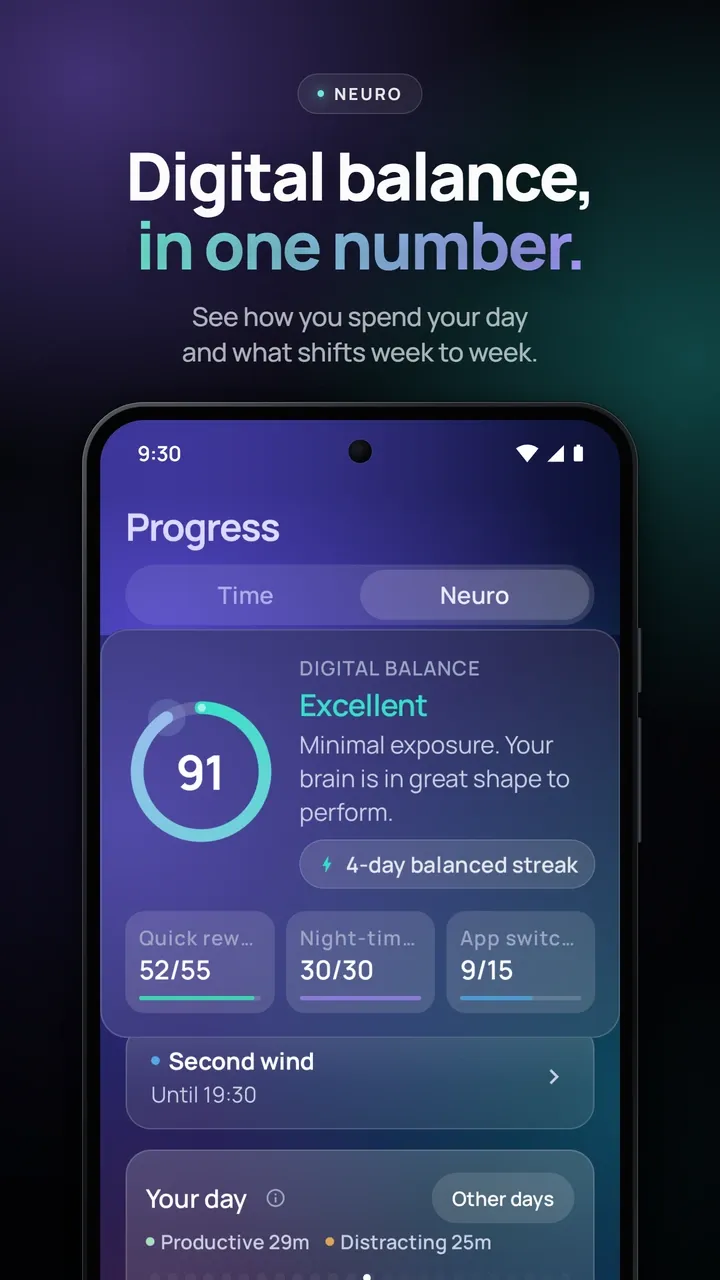
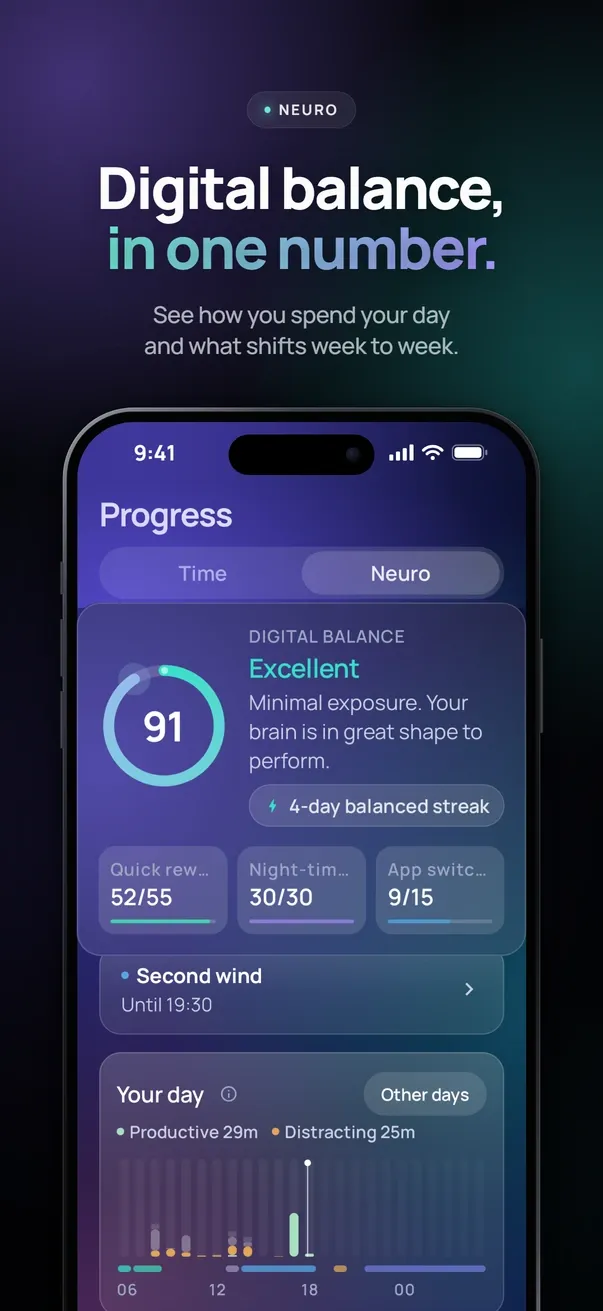
NEURO sums up your day from 0 to 100 and shows the three things that move it: quick-reward apps, night-time use and app switching. Data to act on, not charts to feel bad about.
Free: your Digital Balance · Premium: full NEURO
Digital Balance
Excellent
Minimal exposure. Your brain is in great shape to perform.
4-day balanced streak
Quick reward
52/55Night-time use
30/30App switches
9/15Sample data
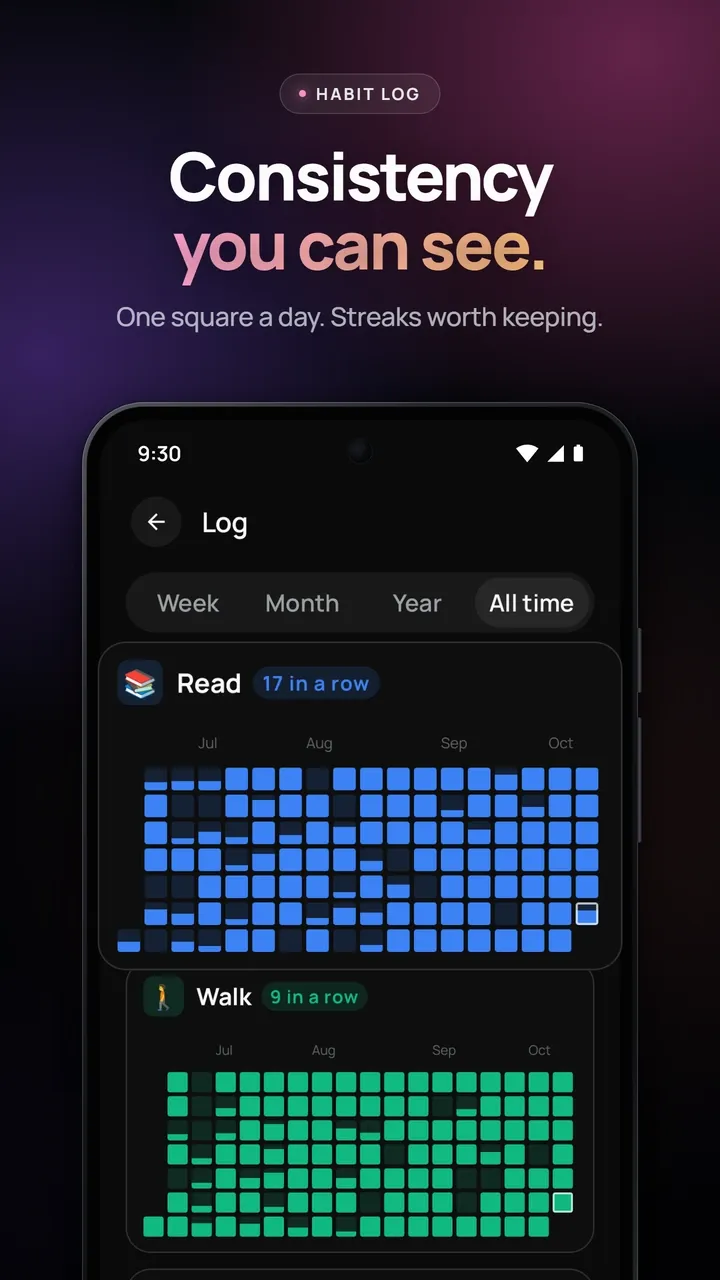
Day 30 The streak
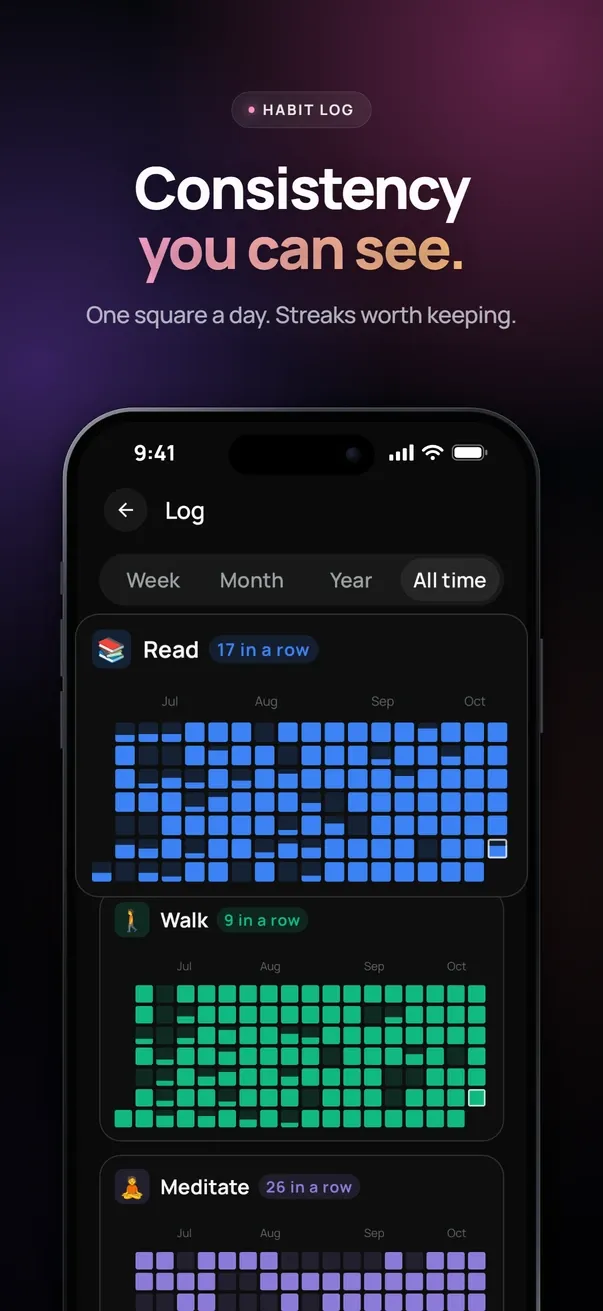
One square a day and a streak worth keeping. The Log stores every habit you complete, so you can see at a glance that this one stuck.
Free: week and month · Premium: year and all time
Sample data
03 / Principles
A blocker that locks you out of your own computer isn’t a blocker. It’s checked twice before acting.
Cutting something off can’t be undone. Vuelve only closes things when it’s sure that’s what you asked for.
If something fails, the blocks stay up: a block that falls over opens exactly what it was meant to protect.
Every metric shows its definition next to the number. And a tip without a published study behind it doesn’t make it into the app.
Your history lives on your machine and the keyboard is never read. Our server only checks your licence: it never sees which apps you use or which sites you visit.
Stop paying and you lose nothing: whatever doesn’t fit the free version is paused exactly as you left it, and comes back the moment you renew.
02 / And also
Block specific sites, all adult content at once, even keywords. With Premium.
Block sites in Safari and in browsers that honour Screen Time, and turn on Apple’s adult filter with one tap. With Premium.
Mornings, work hours, nights, weekends: each block starts and ends on time.
Pausing a block costs what you decided with a clear head: a wait, a sentence typed by hand, a password a friend keeps, or a physical key — a QR code you left in another room.
Silence the notifications of the apps you choose while a block is on. And with Premium, protect Vuelve from being uninstalled at a weak moment.
Trigger the friction when an app opens, or start a Focus alongside Do Not Disturb, with Apple’s Shortcuts.
Your screen time, your streak and what changed, every week on one screen.
No account, no ads, no analytics and no servers: your data never leaves your phone. Back it up whenever you like.
04 / And also
If you drift from your plan, it asks (three times a day at most) and learns from what you answer. What it knows about you, you can see and wipe in Settings.
Every week: what took your time, your reflexes and what slips through, with a single proposal for the next one.
Lessons and tutorials get through; the rest of YouTube is cut off during your hours. Every channel, classified by itself. With Premium.
Track the hours you put into something of yours and save a frame every so often. When you finish, the film. The first one’s free, with “Made with Vuelve”.
Google Calendar in your Planning, both ways, and Outlook or iCloud next to what you actually did. With Premium.
Your setup in one link (“my exam week”). Whoever opens it imports it in one click.
What each app is and what it does to your attention: builds, neutral or drains. It recognises around 390 programs and 480 sites.
Winding back Windows’ clock doesn’t buy you breaks. And with Premium you can shut the back doors: Task Manager and, in the full version, the uninstaller and a 24-hour lock.
Light, dark and AMOLED themes. Full backup and a complete wipe whenever you like, free. CSV export with Premium.
05 / On your phone
On Android and iPhone, Vuelve blocks apps and websites with limits that hold, makes you breathe before you open them, and unlocks your apps once your habit is done. No account, no ads, no servers.
See what it looks like on a phone
On your phone, Premium is bought inside the app through Google Play or the App Store. The Windows licence is separate; the Bundle that joins computer and phone comes later.
03 / Free & Premium · Android and iPhone
The basics never expire and carry no ads. Premium is bought inside the app, through Google Play or the App Store, as a subscription with a free trial or as a one-time purchase. You see the price there, in your currency, before confirming anything.
Free
€0 forever
Premium unlocks everything
Subscription with a free trial, or a one-time purchase. You manage and cancel it from your Google Play or App Store account, like any other purchase.
06 / Pricing · Windows
You start with 14 days of Premium, no card. After that, carry on free with the basics or keep everything. Your licence is your email: nothing to copy.
Free
€0 forever
Premium unlocks everything
Type the email of whoever will use Vuelve: the licence goes in their name even if someone else pays.
14 days of Premium free, no card: Vuelve offers it the first time you open it and only asks for your email, to send you a code. Already installed? Settings → Licence → “Try Premium free for 14 days”.
Studying? €29.99 a year with your school or university email. In the app: Settings → Licence → “I’m a student”.
Prices include VAT. Secure payment with Stripe: card, Apple Pay, Google Pay or PayPal. In Mexico, Colombia, Chile and Peru you pay in your own currency, at a local price. Invoice by email.
The Bundle with the phone comes later. Desktop plan owners will be able to upgrade.
Before you buy: Purchase terms · Privacy policy
07 / Activation
Stripe charges you and tells us. Your licence is tied to the email you use at checkout.
It arrives in seconds with the download link and the steps. No licence keys.
Settings → Licence → “I have a licence”, type your email and the 6-digit code we send. Done.
04/Download
Android 8 or later · free · no account
iPhone and iPad on iOS 16 or later · free · no account
Point your phone’s camera at it
07/Download
Windows 10 / 11, 64-bit · From the Microsoft Store: no Windows warnings · Updates itself
No Store?
The classic installer is the same Vuelve, uninstall lock included. It isn’t signed yet, so Windows may warn you when you open it, and some Windows 11 PCs won’t even let it run: that’s why the Store comes first.
05 / On your computer
Vuelve lives on Windows too: it records where your day goes, sets up your computer for what you’re about to do, and blocks the rest when it matters. Free, with 14 days of Premium.
The Windows licence is separate from the phone purchase; the Bundle that joins the two comes later.
09 / FAQ
It stays on your computer. Vuelve never reads your keyboard, and its server only checks your licence: it never sees which apps you use or which sites you visit.
Yes. The Windows app starts in your Windows language, English or Spanish, and you can switch it in Settings. The Android and iPhone apps are in English too.
Yes, one licence covers two computers at once. From Settings → Licence you can release one to use it elsewhere.
Automatic tracking, the schedule, Planning, the floating panel with Eco, the coach, the night screen and NEURO reminders, in full. And a taste of the rest: two blocks of up to three apps or sites (one can be the whole of “what drains you”), with breathe-before-entering and a ten-second wait to switch them off; one mode that warns you if you drift; one project with the “Made with Vuelve” mark; your bedtime with its heads-up; and the last 7 days of history with the comparison to the week before. Everything else keeps being recorded.
Yes: €29.99 a year with your school or university email. From the app, Settings → Licence → “I’m a student”. If your school doesn’t give you an email, write to us and we’ll sort it out.
Yes. Under Pricing, enter the email of whoever will use Vuelve in “Is someone else paying?”: the licence goes in their name, even if someone else pays.
Premium stays until the end of the period you paid. After that nothing is deleted: whatever doesn’t fit the free version is paused exactly as you left it, and comes back when you renew. A blocking mode already running finishes its session, and the uninstall lock stays on until you ask to remove it.
Yes. The licence renews itself when there’s a connection and lasts a month without one (three months on the yearly plan).
Yes, with the Vuelve extension for Chrome and Edge, which also tracks time per site. The app takes you to its store page and it installs in one click.
Not yet: on Android and iPhone, Premium is bought inside the app through Google Play or the App Store. The Bundle that joins computer and phone comes later.
Not for now: Vuelve for desktop runs on Windows 10 and 11.
If it doesn’t win you over in the first 14 days, write to us and we’ll refund you.
06 / FAQ
Yes. No expiry date and no ads: 2 blocks of up to 5 apps, a schedule, daily limits, waits before pausing, one habit that unlocks apps, Quick Focus and your Digital Balance. Premium adds everything else.
It’s bought inside the app, through Google Play or the App Store: a subscription with a free trial, or a one-time purchase. You see the exact price there, in your currency, before confirming anything.
It stays on your phone. Vuelve has no account, no ads, no analytics and no servers: there is nowhere for your data to go.
To know which app you have open and which site is in your browser’s address bar, and match that against the blocks you created yourself. It doesn’t read or store your screen content, your messages or your passwords, and everything happens on the phone. You can revoke it whenever you like.
Vuelve uses Apple’s Screen Time API to block apps. Apple never tells us which apps you picked or how much you use them: the app works with sealed identifiers only the system understands. Nothing leaves your device.
You can, at the price you set with a clear head: a wait, a breath, a sentence typed by hand, a password someone else keeps, or a physical key.
Yes, with Premium: specific sites, adult content and keywords.
Yes, with Premium, in Safari and in browsers that honour Screen Time, such as Chrome and Firefox. The adult filter is Apple’s own, turned on with one tap.
No, they’re separate purchases: on your phone, Premium is bought through the store; the Windows licence is bought on this site. It doesn’t carry over between Android and iPhone either. The Bundle that joins computer and phone comes later.
English, Spanish, French, German, Japanese and Korean. You can switch inside the app.

Download it free, try Premium for fourteen days and see your day with new eyes.
Download it free and set your first block today. No account, no ads.
